Hello friends, today I'm going to tell about making money by doing work in your free time.
We all know about internet & we frequently use internet. If you have some free time why we just let it pass, instead use it by doing work and make online money by sitting infront of your computer in your home, you don't have to go any where and the good thing is there is no time table, you can do work at any time in which you are free.
Freelancer
This is a site where you can do work.
There is at least some kind of work in which I think your best so, why souldn't we give a try....
Hello friends, I'm a student of Civil Engineering at Paschimanchal Campus, Pokhara, Nepal (www.wrc.edu.np). Being a beginner in blogging sorry for my language.... Lastly if you have any quarry just comment below.....I'll try my best...
2015/07/11
2015/07/04
Gain knowledge
Hello friends, today I'm going to tell you about something which may be useless from his/her point of view....
Today I'm going to say about
Religion
Dr. Zakir Nayak
http://www.irf.net/
http://www.peacetv.in/
https://www.facebook.com/zakirnaik
Brief Introduction of Dr Zakir Naik
A medical doctor by professional training, Dr Zakir Naik is renowned as a dynamic international orator on Islam and Comparative Religion. He is the president of Islamic Research Foundation, Mumbai. He is 49 years old. Dr Zakir clarifies Islamic viewpoints and clears misconceptions about Islam, using the Qur’an, authentic Hadith and other religious Scriptures as a basis, in conjunction with reason, logic and scientific facts. He is popular for his critical analysis and convincing answers to challenging questions posed by audiences after his public talks.
Dr. Zakir Nayak
http://www.irf.net/
http://www.peacetv.in/
https://www.facebook.com/zakirnaik
Brief Introduction of Dr Zakir Naik
A medical doctor by professional training, Dr Zakir Naik is renowned as a dynamic international orator on Islam and Comparative Religion. He is the president of Islamic Research Foundation, Mumbai. He is 49 years old. Dr Zakir clarifies Islamic viewpoints and clears misconceptions about Islam, using the Qur’an, authentic Hadith and other religious Scriptures as a basis, in conjunction with reason, logic and scientific facts. He is popular for his critical analysis and convincing answers to challenging questions posed by audiences after his public talks.
2015/03/26
Make online money...
Hello! friend, if you want to make online money try this site. I am sure you will make money....
contestchest
contestchest
Want to watch cricket world cup match 2015
try these sites...
starsports
Espn
I hope you will enjoy....
try these sites...
starsports
Espn
I hope you will enjoy....
2015/03/07
hello friend, today I want to inform you about a site where you can earn money doing fun and even you can ge $ 5 by just joining...
http://www.sagoon.com
You can use this money online...
http://www.sagoon.com
You can use this money online...
2015/01/06
Hack/Secure Tp-link Router
How to Hack your Tp-link Wifi Router
This only for knowledge porpuse....
This may be illegal in your country...
First lets know how it is easy to hack..
There are several tools that will hack your wifi password like aircrack-ng, reaver, etc.
"QSS" & "PINwpsGUI", these two program can hack your router password in less than two minute.
"Jumpper" & "Dumpper" are the two program of same coding as above program.
Lets see how..
1. Install QSS.
2. Now open PINwpsGUI / Dumpper / WPS pin (which is run of android platform).
3. Go to "Wps" menu.
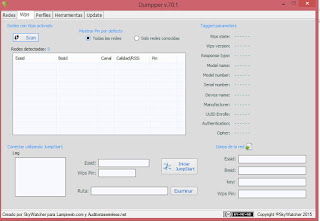
4. Check the "Todas las redes"
5. Click on "Scan".
Now you can see a list of wifi with "WPS" pin.
6. Install QSS / Dumpper.
7. Click on connect with WPS pin.
8. Enter the pin previously obtained.
9. Uncheck the "Automatic Connect"
10. Select the required wifi of which the pin has entered.
11. Click on Connect/ Ok/ Next.
Now you see it says connected.
For wifi password
12. Right click on you wifi icon in the iconbar.
14. Click on "Open Network and Sharing Center".
15. Click on wifi which is connected.
16. Goto "Wireless properties".
17. Goto "Security" menu & check "Show password".
Bingo You Got the password.
Now lets know how to secure it.
Just open your router setup page. Generally by typing "192.168.1.1" or goto your wifi properties seee what is Gateway in adress bar of any browser, then type admin in user and type your password which you have set in the password box or admin whick is default password.
Now change following things in this page:
1. Click on Maintenance and change the password as you like.
2. Click on Advanced Setup and check on Enable in Firewall
2. Click on Interface Setup and the click on LAN and chek on NO in use WPS
and save it.
Now you are secure from this type of attack but there are another tools to hack your password using distionary attack like in aircrack-ng so make your wifi password strong using alphabet, numberes and symbols wich are very strong to find in distionary. For e.g @str0nut5!

This only for knowledge porpuse....
This may be illegal in your country...
First lets know how it is easy to hack..
There are several tools that will hack your wifi password like aircrack-ng, reaver, etc.
"QSS" & "PINwpsGUI", these two program can hack your router password in less than two minute.
"Jumpper" & "Dumpper" are the two program of same coding as above program.
Lets see how..
1. Install QSS.
2. Now open PINwpsGUI / Dumpper / WPS pin (which is run of android platform).
3. Go to "Wps" menu.

4. Check the "Todas las redes"
5. Click on "Scan".
Now you can see a list of wifi with "WPS" pin.
6. Install QSS / Dumpper.
7. Click on connect with WPS pin.
8. Enter the pin previously obtained.
9. Uncheck the "Automatic Connect"
10. Select the required wifi of which the pin has entered.
11. Click on Connect/ Ok/ Next.
Now you see it says connected.
For wifi password
12. Right click on you wifi icon in the iconbar.
14. Click on "Open Network and Sharing Center".
15. Click on wifi which is connected.
16. Goto "Wireless properties".
17. Goto "Security" menu & check "Show password".
Bingo You Got the password.
Now lets know how to secure it.
Just open your router setup page. Generally by typing "192.168.1.1" or goto your wifi properties seee what is Gateway in adress bar of any browser, then type admin in user and type your password which you have set in the password box or admin whick is default password.
Now change following things in this page:
1. Click on Maintenance and change the password as you like.
2. Click on Advanced Setup and check on Enable in Firewall
2. Click on Interface Setup and the click on LAN and chek on NO in use WPS
and save it.
Now you are secure from this type of attack but there are another tools to hack your password using distionary attack like in aircrack-ng so make your wifi password strong using alphabet, numberes and symbols wich are very strong to find in distionary. For e.g @str0nut5!
Hello, friends ! Want to earn money !
I want to share some idea about earning online money. There are different sites where you can fill the form and take survey, poll, do task, share, etc and you can make money. Making online money is not so easy but also it in not so hard, it will take time & labour but don't worry if you work hard you will get a fruitfull result..
These are the list of sites:
Touna, pinecone, vivantic, Mysurvey, Hiving, Palelbase, youGov,
NewVista, Global Test Market, The opinionPanel, Toluna, etc
You can also go contestchest where you can find contest and take part in and if you win, you know you will be rewarded...
I want to share some idea about earning online money. There are different sites where you can fill the form and take survey, poll, do task, share, etc and you can make money. Making online money is not so easy but also it in not so hard, it will take time & labour but don't worry if you work hard you will get a fruitfull result..
These are the list of sites:
Touna, pinecone, vivantic, Mysurvey, Hiving, Palelbase, youGov,
NewVista, Global Test Market, The opinionPanel, Toluna, etc
You can also go contestchest where you can find contest and take part in and if you win, you know you will be rewarded...
Subscribe to:
Posts (Atom)


